Introduction
Welcome to APIMOVE's Tyremotion API documentation. You can use our API to retrieve tyre dimensions, tyre data and car model information from wheel images.
This documentation provides all the technical information needed to integrate the Tyremotion API into your website or application. There you will find detailed instructions on using and configuring the API. We've also included sample code to help you get started quickly and integrate the API seamlessly.
We are committed to providing our customers with the best possible experience and making the Tyremotion API integration as easy and seamless as possible. Other resources such as Swagger UI or Postman collections are also available to help you get the best out of our solution.
We're excited to work with you and look forward to seeing how our API integration can improve your processes.
Common
Healthcheck
This endpoint allows you to quickly check the health of the Tyremotion API. For example, you may use this health check to show/hide features linked to the Tyremotion API depending on the health status.
curl \
--location 'https://api.tyremotion.fr/public/health'
import requests

response = requests.get("https://api.tyremotion.fr/public/health")

print(response.text)
const axios = require('axios');

axios.get('https://api.tyremotion.fr/public/health')
  .then(response => {
    console.log(response.data);
  })
When the Tyremotion API is up and running the response is a 200 OK HTTP status code with raw content:
healthy
HTTP Request
GET https://api.tyremotion.fr/public/health
Response
When the Tyremotion API is up and running the response is a 200 OK HTTP status code with raw content: healthy.
Otherwise, the server responds with an error HTTP status code such as: 408 Request Timeout, 503 Service unavailable.
Authentication
To authorize, use this code to pass the correct header with each request:
import requests

headers = {
  'Authorization': 'Bearer <YOUR-API-KEY>'
}

response = requests.get(api_endpoint, headers=headers)
curl "api_endpoint" \
  -H "Authorization: Bearer <YOUR-API-KEY>"
const axios = require('axios');

const headers = {
  'Authorization': 'Bearer <YOUR-API-KEY>'
};

axios.get(api_endpoint, { headers })
Make sure to replace
<YOUR-API-KEY>with your API key.
Tyremotion uses API keys to allow access to the API. If you don't have your API key yet, please reach out to our team to get one.
Tyremotion expects for the API key to be included in all API requests to the server in a header that looks like the following:
Authorization: Bearer <YOUR-API-KEY>
We recommend you complete the API key authorization with IP filtering to secure your account.
Size recognition
Perform a size recognition
This endpoint is the main endpoint of the Tyremotion API. Given an image of a wheel as input, the API will respond with the corresponding car models and tyre sizes.
curl \
--location 'https://api.tyremotion.fr/v2/size-recognition' \
--header 'Authorization: Bearer <YOUR-API-KEY>' \
--form 'image=@"/path/to/image.png"'
import requests

with open(image_path, 'rb') as image_file:
    image = FileStorage(image_file, image_file.name, name=image_file.name)
    response = requests.post('https://api.tyremotion.fr/v2/size-recognition',
                             headers={'Authorization': 'Bearer <YOUR-API-KEY>'},
                             files={'image': image})
    print(response.text)
const axios = require('axios');
const fs = require('fs');

const headers = {
  'Authorization': 'Bearer <YOUR-API-KEY>'
};

const formData = new FormData();
formData.append('image', fs.createReadStream(image_path));

axios.post('https://api.tyremotion.fr/v2/size-recognition', formData, { headers })
  .then(response => {
    console.log(response.data);
  });
The above command returns a JSON with the corresponding car models and tyre sizes when the recognition is successful:
{
  "id": 1,
  "result": {
    "car_models_matches": 1,
    "car_models": [
      {
        "brand": "RENAULT",
        "model": "CLIO IV",
        "start_year": "2013",
        "end_year": "2019",
        "wheel_cover": "W",
        "tyre_dimensions": {
          "current": {
            "tyresize": "195/55 R 16 87H",
            "width": "195",
            "height": "55",
            "structure": "R",
            "diameter": "16",
            "load_index": "87",
            "speed_index": "H",
            "xl": false,
            "runflat": false,
            "original_equipment": null,
            "comment_info": null,
            "comment_technical": null,
            "3pmsf": true,
            "tyre_brand": "MICHELIN",
            "tyre_line": "PRIMACY 3",
            "tyre_dot": "DOTHD5J05UX5023",
            "tyre_dot_confidence": 0.91,
            "tyre_dot_date": "5023",
            "tyre_dot_date_confidence": 0.94
          },
          "oe_front": {
            "tyresize": "195/55 R 16 87H",
            "width": "195",
            "height": "55",
            "structure": "R",
            "diameter": "16",
            "load_index": "87",
            "speed_index": "H",
            "xl": false,
            "runflat": false,
            "original_equipment": null,
            "comment_info": null,
            "comment_technical": null
          },
          "oe_rear": {
            "tyresize": "195/55 R 16 87H",
            "width": "195",
            "height": "55",
            "structure": "R",
            "diameter": "16",
            "load_index": "87",
            "speed_index": "H",
            "xl": false,
            "runflat": false,
            "original_equipment": null,
            "comment_info": null,
            "comment_technical": null
          }
        },
        "pressure": {
          "front": 2.2,
          "rear": 2.0
        }
      }
    ]
  },
  "error": null,
  "confidence": 0.9,
  "suspected_abuse": false
}
The above command returns a JSON with the encountered error when no tyre dimension could be found from the input image:
{
  "id": 1,
  "result": null,
  "error": {
    "code": 1,
    "type": "no-wheel-in-image",
    "message": "No wheel found",
    "detail": "No wheel was found in the image"
  },
  "confidence": null,
  "suspected_abuse": false
}
HTTP Request
POST https://api.tyremotion.fr/v2/size-recognition
Header
In addition to the required authentication header, the Tyremotion API accepts an optional header for spam prevention.
By adding the following header, the Tyremotion API will not provide an answer and will not bill the API request
if the request is detected as spam. The spam detection is the same as the one performed for the suspected_abuse
field of the API response. With the no-abuse header, requests detected as spam will return a 403 HTTP error code.
X-Abuse-Detection: no-abuse
Body
The body of the request uses the FormData interface.
| Key | Value | Description |
|---|---|---|
| image | Binary data | Image file of the wheel, facing the rim. Accepted file formats are: jpg, jpeg, png, bmp, webp, web, jfif. Maximum payload size: 20MB. |
Response
There are two possible scenarios for the response:
- Successful size recognition: Tyremotion API has found at least one tyre size matching with the input image. The
resultfield is present in the response JSON. Theerrorfield is null. - Failing size recognition: Tyremotion API is not able to provide tyre sizes from the input image. The
errorfield is present in the response JSON. See potential errors.resultandconfidencefields are null.
SizeRecognitionResponse
| Field name | Type | Nullable | Description |
|---|---|---|---|
| id | int | False | Unique identifier of the request. Each POST size-recognition request has its own id. |
| result | SizeRecognition | True | Details about the car models and tyre sizes recognized by our API. |
| error | Error | True | Details about the error that occured during the recognition process. |
| confidence | float | True | Confidence score of the result. Expressed as a percentage value between 0 and 1. A value of 0.9 means: the likelihood that the result of Tyremotion's size recognition is correct is at least 90%. |
| suspected_abuse | boolean | True | A field that is set to true when we suspect the request to be a spam. false when we do not suspect the request to be a spam. |
SizeRecognition (SizeRecognitionResponse)
| Field name | Type | Nullable | Description |
|---|---|---|---|
| car_models_matches | int | False | Number of possible car models that match with the input wheel image. Corresponds to the size of the car_models list. |
| car_models | CarModel[] | False | List of the car models that match with the input wheel image. |
CarModel (SizeRecognitionResponse)
Thanks to our database, we are able to match the input wheel image to its corresponding car model. However, in some cases (e.g. wheel covers, iron wheels, non-OE rims) it is not possible to find a matching car model.
Hence, there are two possibilities for the car model content:
- the car model is found: fields related to the car model
brand,model,wheel_cover,start_year,end_yearare specified. - the car model is not found but a tyre size could still be extracted: fields related to the car model
brand,model,wheel_cover,start_year,end_yearare null. The extracted tyresize is nested in thetyre_dimensionsfield
| Field name | Type | Nullable | Description |
|---|---|---|---|
| brand | string | True | Name of the car brand. Ex: RENAULT, AUDI, LAND ROVER. |
| model | string | True | Name of the car model. Ex: CLIO IV, 5008. |
| wheel_cover | Enum | True | Indicates whether the car model uses rims W, wheel covers C or iron rims T. |
| start_year | string | True | First year of car model marketing. Ex: 2010. |
| end_year | string | True | Last year of car model marketing. Ex: 2015. |
| tyre_dimensions | TyreDimensions | False | Details about the tyres dimensions. |
| pressure | Pressure | True | Details about the recommended tyre pressures. |
TyreDimensions (SizeRecognitionResponse)
There are three possible scenarios for the tyre dimensions:
- the car model is known and tyre data is readable on the tyre sidewall:
current,oe_frontandoe_rearare specified - the car model is known but tyre data is not readable on the tyre sidewall:
currentis null,oe_frontandoe_rearare specified - the car model is unknown but tyre data is readable on the tyre sidewall:
currentis specified,oe_frontandoe_rearare null
When the three tyre dimensions are specified, you are sure their width, height and diameter are similar.
Differences may be observed between the current tyresize and the original equipment (oe) tyresize on load_index and speed_index when tyres are mounted with superior indexes (winter season tyres for example).
| Field name | Type | Nullable | Description |
|---|---|---|---|
| current | CurrentTyreDimension | True | Details about the tyre dimension of the tyre in the input image. |
| oe_front | TyreDimension | True | Details about the tyre dimension of the front tyres of the car model. These specifications are the original equipment dimensions (recommended by car manufacturer). |
| oe_rear | TyreDimension | True | Details about the tyre dimension of the rear tyres of the car model. These specifications are the original equipment dimensions (recommended by car manufacturer). |
CurrentTyreDimension (SizeRecognitionResponse)
| Field name | Type | Nullable | Description |
|---|---|---|---|
| tyresize | string | False | Full tyre size. Ex: 195/55 R 16 87V. |
| width | string | False | Width of the tyre. Ex: 195. |
| height | string | False | Height of the sidewall, also known as the aspect ratio. Ex: 55. |
| structure | string | False | Structure of the construction of reinforcement material. Ex: R for Radial tyre, C for Crossply, ZR for Performance Radial construction. |
| diameter | string | False | Rim diameter. Ex: 16. |
| load_index | string | True | Tyre load capacity. Ex: 87. There can be several load indexes, in this case, the values are separated with a semicolon and we place the most common load index first. Ex: 88;92, the two load indexes 88 and 92 are accepted for this tyre. However 88 is the most commonly used in the industry. |
| speed_index | string | True | Speed rating. Ex: V. There can be several speed indexes, in this case, the values are separated with a semicolon and we place the most common speed index first. Ex: Q;T, the two speed indexes Q and T are accepted for this tyre. However Q is the most commonly used in the industry. |
| xl | boolean | True | Extra load tyre. The value is true when the tyre is marked as supporting Extra Load. false otherwise. null when unknown. |
| runflat | boolean | True | Run-flat tyre. The value is true when the tyre possesses the run-flat technology. false otherwise. null when unknown. |
| original_equipment | string | True | Value of the Original Equipment (OE) mark specified on the tyre sidewall and that indicates the car manufacturer the tyre has been designed for. Ex: AR for Alfa Romeo, LR for Land Rover, VOL for Volvo. |
| comment_info | string | True | Free text that provides additional, unmandatory general information about the tyre. |
| comment_technical | string | True | Free text that provides additional, unmandatory technical information about the tyre. |
| 3pmsf | boolean | True | Three-Peak Mountain SnowFlake. The value is true when the tyre is marked with 3PMSF certification. null when no 3PMSF marking is found on the tyre sidewall. |
| tyre_brand | string | True | The tyre brand read on the tyre side. null when no known tyre brand was found. |
| tyre_line | string | True | BETA - The tyre line (model) read on the tyre side. null when no known tyre line matching with the tyre brand was found. |
| tyre_dot | string | True | BETA - Department of Transportation (DOT) read on the tyre sidewall. The DOT can include the 'D', 'O', 'T' characters when these letters are present on the tyre sidewall (e.g. DOTB94WHWNX3903) or exclude the 'D', 'O', 'T' characters when these letters are not present on the tyre sidewall (e.g. CO6LJEER4319). null when no DOT was found. |
| tyre_dot_confidence | float | True | BETA - Confidence score of the tyre_dot field. Expressed as a percentage value between 0 and 1. Corresponds to the mean of the reading confidences of each character in the tyre_dot string. null when no DOT was found. |
| tyre_dot_date | string | True | BETA - The date part of the DOT read on the tyre sidewall. It is made of 4 digits: the first 2 represent the manufacturing week of the year, and the last 2 digits match with the manufacturing year. null when no DOT was found. |
| tyre_dot_date_confidence | float | True | BETA - Confidence score of the tyre_dot_date field. Expressed as a percentage value between 0 and 1. Corresponds to the mean of the reading confidences of each character in the tyre_dot_date string. null when no DOT was found. |
TyreDimension (SizeRecognitionResponse)
| Field name | Type | Nullable | Description |
|---|---|---|---|
| tyresize | string | False | Full tyre size. Ex: 195/55 R 16 87V. |
| width | string | False | Width of the tyre. Ex: 195. |
| height | string | False | Height of the sidewall, also known as the aspect ratio. Ex: 55. |
| structure | string | False | Structure of the construction of reinforcement material. Ex: R for Radial tyre, C for Crossply, ZR for Performance Radial construction. |
| diameter | string | False | Rim diameter. Ex: 16. |
| load_index | string | True | Tyre load capacity. Ex: 87. There can be several load indexes, in this case, the values are separated with a semicolon and we place the most common load index first. Ex: 88;92, the two load indexes 88 and 92 are accepted for this tyre. However 88 is the most commonly used in the industry. |
| speed_index | string | True | Speed rating. Ex: V. There can be several speed indexes, in this case, the values are separated with a semicolon and we place the most common speed index first. Ex: Q;T, the two speed indexes Q and T are accepted for this tyre. However Q is the most commonly used in the industry. |
| xl | boolean | True | Extra load tyre. The value is true when the tyre is marked as supporting Extra Load. false otherwise. null when unknown. |
| runflat | boolean | True | Run-flat tyre. The value is true when the tyre possesses the run-flat technology. false otherwise. null when unknown. |
| original_equipment | string | True | Value of the Original Equipment (OE) mark specified on the tyre sidewall and that indicates the car manufacturer the tyre has been designed for. Ex: AR for Alfa Romeo, LR for Land Rover, VOL for Volvo. |
| comment_info | string | True | Free text that provides additional, unmandatory general information about the tyre. |
| comment_technical | string | True | Free text that provides additional, unmandatory technical information about the tyre. |
Pressure (SizeRecognitionResponse)
| Field name | Type | Nullable | Description |
|---|---|---|---|
| front | float | False | Recommended pressure of the front tyres, in bars. Ex: 2.4. |
| rear | float | False | Recommended pressure of the rear tyres, in bars. Ex: 2.2. |
Error (SizeRecognitionResponse)
| Field name | Type | Nullable | Description |
|---|---|---|---|
| code | integer | False | Unique identifier of the code of error. |
| type | string | False | Unique string indicating the type of error. See potential errors below. |
| message | string | False | Short error message. |
| detail | string | False | Long error message detailing the reason of the recognition failure. |
Errors (SizeRecognitionResponse)
| Code | Type | Message | Detail |
|---|---|---|---|
| 1 | no-wheel-in-image | No wheel found | No wheel was found in the image |
| 2 | failed-size-recognition | Failed size recognition | The wheel was not processable to obtain tyre dimensions |
| 3 | bad-position-angle | Photo taken with too much angle | The picture angle is too narrow for the wheel to be processed. The camera must be facing the rim |
| 4 | bad-position-distance | Photo taken too far away | The wheel is too small in the picture to be processed |
| 5 | low-confidence | The result found is too uncertain to be usable | The confidence score associated with the car model(s) found and/or the tyre dimension read is too low. The risk of error is too high for the result to be usable. This is usually linked to the picture quality, you may submit a new picture to improve the confidence score. |
Get a previous size recognition
When you perform a size recognition, you are provided with a size recognition id in the response. You can use this id to later retrieve the details of this size recognition.
You can replace 123456 by the id of the size recognition you want to retrieve.
curl \
--location 'https://api.tyremotion.fr/v2/size-recognition/123456' \
--header 'Authorization: Bearer <YOUR-API-KEY>'
import requests

response = requests.get("https://api.tyremotion.fr/v2/size-recognition/123456",
                        headers={'Authorization': 'Bearer <YOUR-API-KEY>'})

print(response.text)
const axios = require('axios');

const headers = {
  'Authorization': 'Bearer <YOUR-API-KEY>'
};

axios.get('https://api.tyremotion.fr/v2/size-recognition/123456', { headers })
  .then(response => {
    console.log(response.data);
  })
The above command returns a JSON with the details of the size recognition. When no verdict has been set for the size recognition, the response looks like:
{
  "id": 123456,
  "recognition_date": "12-29-2022"
}
When a verdict has been set and the user has added details, the response looks like:
{
  "id": 123456,
  "recognition_date": "12-29-2022",
  "verdict": "disapprove",
  "verdict_date": "12-29-2022",
  "verdict_details": {
    "brand": "AUDI",
    "model": "A1",
    "tyresize": "185/65R15 88",
    "plate": "AB 123 CD",
    "comments": "A nice looking audi"
  }
}
HTTP Request
GET https://api.tyremotion.fr/v2/size-recognition/<size-recognition-id>
Response
| Field name | Type | Optional | Description |
|---|---|---|---|
| id | integer | False | Unique identifier of the size recognition request. Each POST size-recognition request has its own id. |
| recognition_date | datetime | False | Datetime of the POST size-recognition request. |
| verdict | string | True | Value of the verdict you applied to the size recognition with the PUT verdict. The value is equal to approve when the user has approved the size recognition result, disapprove otherwise. If no verdict has been set, the field is undefined. |
| verdict_date | datetime | True | Datetime of the last verdict applied to the size recognition result. |
| verdict_details | VerdictDetails | True | Details about the verdict values set by the user. |
Put a verdict to a size recognition
We are constantly improving our AI models and database. However, depending on the picture quality, the rarity of the model photographed or a mismatch between two models, it can happen that the Tyremotion response contains some errors.
In order to avoid such errors, we put a lot of effort into correcting our models based on real-case scenarios. To be able to do so, we need data coming from various sources, in various environments. That is where you can help us !
When receiving a size recognition result, you have the possibility to ask the user for a verdict. A verdict is a way of saying: "I agree with the result" or "I disagree with the result". Sending back verdicts really helps us to fine tune our models and reduce the number of errors. In a way, it will help you too.
You can replace 123456 by the id of the size recognition you want to set the verdict for.
curl \
--location --request PUT 'https://api.tyremotion.fr/v2/size-recognition/123456/verdict' \
--header 'Authorization: Bearer <YOUR-API-KEY>' \
--header 'Content-Type: application/json' \
--data '{
  "verdict": "approve"
}'
import requests
import json

headers = {
  'Authorization': <YOUR-API-KEY>,
  'Content-Type': 'application/json'
}
data = json.dumps({
  "verdict": "approve"
})

response = requests.put("https://api.tyremotion.fr/v2/size-recognition/123456/verdict",
                        headers=headers,
                        data=data)

print(response.text)
const axios = require('axios');

const headers = {
  'Authorization': '<YOUR-API-KEY>',
  'Content-Type': 'application/json'
};
const data = {
  "verdict": "approve"
};

axios.put('https://api.tyremotion.fr/v2/size-recognition/123456/verdict', data, { headers })
  .then(response => {
    console.log(response.data);
  })
You can also add details to your verdict in the payload JSON
curl \
--location --request PUT 'https://api.tyremotion.fr/v2/size-recognition/123456/verdict' \
--header 'Authorization: Bearer <YOUR-API-KEY>' \
--header 'Content-Type: application/json' \
--data '{
  "verdict": "disapprove",
  "details": {
    "brand": "AUDI",
    "model": "A1",
    "tyresize": "185/65R15 88",
    "plate": "AB 123 CD"
  }
}'
import requests
import json

headers = {
  'Authorization': <YOUR-API-KEY>,
  'Content-Type': 'application/json'
}
data = json.dumps({
  "verdict": "disapprove",
  "details": {
    "brand": "AUDI",
    "model": "A1",
    "tyresize": "185/65R15 88",
    "plate": "AB 123 CD"
  }
})

response = requests.put("https://api.tyremotion.fr/v2/size-recognition/123456/verdict",
                        headers=headers,
                        data=data)

print(response.text)
const axios = require('axios');

const headers = {
  'Authorization': '<YOUR-API-KEY>',
  'Content-Type': 'application/json'
};
const data = {
  "verdict": "disapprove",
  "details": {
    "brand": "AUDI",
    "model": "A1",
    "tyresize": "185/65R15 88",
    "plate": "AB 123 CD"
  }
};

axios.put('https://api.tyremotion.fr/v2/size-recognition/123456/verdict', data, { headers })
  .then(response => {
    console.log(response.data);
  })
HTTP Request
PUT https://api.tyremotion.fr/v2/size-recognition/<size-recognition-id>/verdict
Body
The body of the request uses the application/json format.
| Key | Value | Optional | Description |
|---|---|---|---|
| verdict | string | False | approve when you want the verdict to confirm the API response. disapprove when you reject the API response. |
| details | VerdictDetails | True | Details about the size recognition result, specified by the end user. |
VerdictDetails
| Key | Value | Optional | Description |
|---|---|---|---|
| brand | string | True | Actual brand of the car model corresponding to the input image, according to the user setting the verdict. |
| model | string | True | Actual car model corresponding to the input image, according to the user setting the verdict. |
| tyresize | string | True | Actual tyre size of the tyre corresponding to the input image, according to the user setting the verdict. |
| plate | string | True | License plate of the car corresponding to the input image. |
| comments | string | True | Free text the user setting the verdict has added to give additional information about the verdict. |
Wheel data extraction
Perform a wheel data extraction
Unlike the Size Recognition endpoint, this endpoint focuses on extracting the maximum amount of information from a wheel image, not just the tyre dimensions. The endpoint does not perform business logic to verify OE (Original Equipment) information against the tyre sidewall data. Given an image of a wheel (or part of it), the API responds with potentially matching car models (OE data) and detailed information read from the tyre sidewall.
curl \
--location 'https://api.tyremotion.fr/v2/wheel-data-extraction' \
--header 'Authorization: Bearer <YOUR-API-KEY>' \
--form 'image=@"/path/to/image.png"'
import requests

with open(image_path, 'rb') as image_file:
    image = FileStorage(image_file, image_file.name, name=image_file.name)
    response = requests.post('https://api.tyremotion.fr/v2/wheel-data-extraction',
                             headers={'Authorization': 'Bearer <YOUR-API-KEY>'},
                             files={'image': image})
    print(response.text)
const axios = require("axios");
const fs = require("fs");

const headers = {
  Authorization: "Bearer <YOUR-API-KEY>",
};

const formData = new FormData();
formData.append("image", fs.createReadStream(image_path));

axios
  .post("https://api.tyremotion.fr/v2/wheel-data-extraction", formData, {
    headers,
  })
  .then((response) => {
    console.log(response.data);
  });
The above command returns a JSON with the matching car models and read information when the wheel data extraction is successful:
{
    "id": 1,
    "processing_time": 4.54,
    "rim_recognition": {
        "car_models": [
            {
                "brand": "FORD",
                "end_year": null,
                "model": "MACH-E",
                "pressure": {
                    "front": 2.7,
                    "rear": 2.6
                },
                "start_year": "2021",
                "tyre_dimensions": {
                    "current": null,
                    "oe_front": {
                        "comment_info": null,
                        "comment_technical": null,
                        "diameter": "19",
                        "height": "55",
                        "load_index": "103",
                        "original_equipment": null,
                        "runflat": false,
                        "speed_index": "V",
                        "structure": "R",
                        "tyresize": "225/55 R 19 103V XL",
                        "width": "225",
                        "xl": true
                    },
                    "oe_rear": {
                        "comment_info": null,
                        "comment_technical": null,
                        "diameter": "19",
                        "height": "55",
                        "load_index": "103",
                        "original_equipment": null,
                        "runflat": false,
                        "speed_index": "V",
                        "structure": "R",
                        "tyresize": "225/55 R 19 103V XL",
                        "width": "225",
                        "xl": true
                    }
                },
                "wheel_cover": "W"
            }
        ],
        "confidence": 0.9,
        "error": null
    },
    "source_image_url": "https://path/to/source/image/93a26336-9f6b-4588-b87d-d36e4e6be82b.jpg",
    "suspected_abuse": false,
    "tyre_reading": {
        "3pmsf": null,
        "3pmsf_confidence": null,
        "3pmsf_reading_zones": null,
        "brand": "MICHELIN",
        "brand_reading_zones": [
          {
            "p1": {
              "x": 3881,
              "y": 6606
            },
            "p2": {
              "x": 4100,
              "y": 6344
            },
            "p3": {
              "x": 4147,
              "y": 6383
            },
            "p4": {
              "x": 3927,
              "y": 6644
            }
          }
        ],
        "brand_similarity_score": 0.88,
        "diameter": "19",
        "diameter_confidence": 0.8798863636363636,
        "dot": "B9JN004X1223",
        "dot_confidence": 0.67,
        "dot_date": "1223",
        "dot_date_confidence": 0.82,
        "dot_date_reading_zones": [
          {
            "p1": {
              "x": 1974,
              "y": 3181
            },
            "p2": {
              "x": 2161,
              "y": 3151
            },
            "p3": {
              "x": 2172,
              "y": 3219
            },
            "p4": {
              "x": 1985,
              "y": 3249
            }
          }
        ],
        "dot_reading_zones": [
          {
            "p1": {
              "x": 1315,
              "y": 3384
            },
            "p2": {
              "x": 2146,
              "y": 3108
            },
            "p3": {
              "x": 2179,
              "y": 3210
            },
            "p4": {
              "x": 1349,
              "y": 3485
            }
          }
        ],
        "height": "55",
        "height_confidence": 0.899888888888889,
        "line": "PRIMACY 4",
        "line_reading_zones": [
          {
            "p1": {
              "x": -110,
              "y": 5452
            },
            "p2": {
              "x": 300,
              "y": 3865
            },
            "p3": {
              "x": 525,
              "y": 3924
            },
            "p4": {
              "x": 114,
              "y": 5510
            }
          }
        ],
        "line_similarity_score": 0.91,
        "load_index": "103",
        "load_index_confidence": 0.8629679370302843,
        "raw_text": "__warningemperatureactiona_michelinprimacya/s_225/55r19103hextraloadf3408f_trsolyererformance_temperatureactiona__totalperformance",
        "runflat": null,
        "runflat_confidence": null,
        "speed_index": "H",
        "speed_index_confidence": 0.8799999999999999,
        "tyresize": "225/55 R 19 103H",
        "tyresize_confidence": 0.8836610752096842,
        "tyresize_reading_zones": [
          {
            "p1": {
              "x": 3345,
              "y": 3428
            },
            "p2": {
              "x": 3407,
              "y": 3348
            },
            "p3": {
              "x": 4006,
              "y": 3806
            },
            "p4": {
              "x": 3944,
              "y": 3887
            }
          },
          {
            "p1": {
              "x": 3347,
              "y": 3432
            },
            "p2": {
              "x": 3391,
              "y": 3364
            },
            "p3": {
              "x": 3835,
              "y": 3655
            },
            "p4": {
              "x": 3791,
              "y": 3722
            }
          }
        ],
        "width": "225",
        "width_confidence": 0.8965682656826569,
        "xl": true,
        "xl_confidence": 0.96,
        "xl_reading_zones": [
          {
            "p1": {
              "x": 3404,
              "y": 3222
            },
            "p2": {
              "x": 3547,
              "y": 3064
            },
            "p3": {
              "x": 4501,
              "y": 3925
            },
            "p4": {
              "x": 4358,
              "y": 4083
            }
          }
        ]
    }
}
The above command returns a JSON with null fields and error causes when no data could be extracted from the input image:
{
    "id": 1,
    "processing_time": 2.01,
    "rim_recognition": {
        "car_models": [],
        "confidence": null,
        "error": {
            "code": 1,
            "type": "no-wheel-in-image",
            "message": "No wheel found",
            "detail": "No wheel was found in the image"
        }
    },
    "source_image_url": "https://path/to/source/image/12a26336-9f6b-4588-b87d-d36e4e6be742.jpg",
    "suspected_abuse": false,
    "tyre_reading": {
        "3pmsf": null,
        "3pmsf_confidence": null,
        "3pmsf_reading_zones": null,
        "brand": null,
        "brand_reading_zones": null,
        "brand_similarity_score": null,
        "diameter": null,
        "diameter_confidence": null,
        "dot": null,
        "dot_confidence": null,
        "dot_date": null,
        "dot_date_confidence": null,
        "dot_date_reading_zones": null,
        "dot_reading_zones": null,
        "height": null,
        "height_confidence": null,
        "line": null,
        "line_reading_zones": null,
        "line_similarity_score": null,
        "load_index": null,
        "load_index_confidence": null,
        "raw_text": null,
        "runflat": null,
        "runflat_confidence": null,
        "speed_index": null,
        "speed_index_confidence": null,
        "tyresize": null,
        "tyresize_confidence": null,
        "tyresize_reading_zones": null,
        "width": null,
        "width_confidence": null,
        "xl": null,
        "xl_confidence": null,
        "xl_reading_zones": null
    }
}
HTTP Request
POST https://api.tyremotion.fr/v2/wheel-data-extraction
Header
In addition to the required authentication header, the Tyremotion API accepts an optional header for spam prevention.
By adding the following header, the Tyremotion API will not provide an answer and will not bill the API request
if the request is detected as spam. The spam detection is the same as the one performed for the suspected_abuse
field of the API response. With the no-abuse header, requests detected as spam will return a 403 HTTP error code.
X-Abuse-Detection: no-abuse
Body
The body of the request uses the FormData interface.
| Key | Value | Description |
|---|---|---|
| image | Binary data | Image file of the wheel or tyre. Accepted file formats are: jpg, jpeg, png, bmp, webp, web, jfif. Maximum payload size: 20MB. |
Response
Response fields of the Wheel Data Extraction endpoint are defaulted to null or empty values. When the TYREMOTION technology manages to extract information from the input image, corresponding response fields are filled in.
WheelDataResponse
| Field name | Type | Nullable | Description |
|---|---|---|---|
| id | int | False | Unique identifier of the request. Each POST wheel-data-extraction request has its own id. |
| processing_time | float | True | Time (in seconds) the API took to process the image. This processing time does not include the network time needed to send the image from the sender's server to the TYREMOTION API. |
| rim_recognition | RimRecognition | False | Details about the Original Equipment (OE) information of the wheel, extracted from the rim. Details about the rim recognition error cause when failing. |
| tyre_reading | TyreReading | False | Details about the information extracted from the tyre sidewall. |
| suspected_abuse | boolean | True | A field that is set to true when we suspect the request to be a spam. false when we do not suspect the request to be a spam. |
RimRecognition (WheelDataResponse)
| Field name | Type | Nullable | Description |
|---|---|---|---|
| car_models | CarModel[] | False | List of the car models matching the input wheel image. Constructed similarly to the Size Recognition endpoint car model, but the current tyre dimension is always null because results are not matched with the tyre sidewall data. Empty if no match is found. |
| confidence | float | True | Confidence score of the rim recognition. Expressed as a percentage value between 0 and 1. A value of 0.9 means: the likelihood that the rim matched from our database is actually the rim in the input image is equal to 90%. |
| error | Error | True | Details about the error that occured during the rim recognition process. This field is non-null only if the API was unable to confidently identify the rim or its associated car model from the image. The presence of an error in this field does not mean the entire recognition has failed. Even if rim recognition fails (e.g., due to poor image angle or quality), the API may still successfully extract tyre information via the TyreReading field. |
CarModel (WheelDataResponse)
| Field name | Type | Nullable | Description |
|---|---|---|---|
| brand | string | True | Name of the car brand. Ex: RENAULT, AUDI, LAND ROVER. |
| model | string | True | Name of the car model. Ex: CLIO IV, 5008. |
| wheel_cover | Enum | True | Indicates whether the car model uses rims W, wheel covers C or iron rims T. |
| start_year | string | True | First year of car model marketing. Ex: 2010. |
| end_year | string | True | Last year of car model marketing. Ex: 2015. |
| tyre_dimensions | TyreDimensions | False | Details about the tyres dimensions. |
| pressure | Pressure | True | Details about the recommended tyre pressures. |
TyreDimensions (WheelDataResponse)
| Field name | Type | Nullable | Description |
|---|---|---|---|
| current | null | True | Always null because current tyre size and OE size are decoupled. Current size information is available in TyreReading. |
| oe_front | TyreDimension | True | Details about the tyre dimension of the front tyres of the car model. These specifications are the original equipment dimensions (recommended by car manufacturer). |
| oe_rear | TyreDimension | True | Details about the tyre dimension of the rear tyres of the car model. These specifications are the original equipment dimensions (recommended by car manufacturer). |
TyreDimension (WheelDataResponse)
| Field name | Type | Nullable | Description |
|---|---|---|---|
| tyresize | string | False | Full tyre size. Ex: 195/55 R 16 87V. |
| width | string | False | Width of the tyre. Ex: 195. |
| height | string | False | Height of the sidewall, also known as the aspect ratio. Ex: 55. |
| structure | string | False | Structure of the construction of reinforcement material. Ex: R for Radial tyre, C for Crossply, ZR for Performance Radial construction. |
| diameter | string | False | Rim diameter. Ex: 16. |
| load_index | string | True | Tyre load capacity. Ex: 87. There can be several load indexes, in this case, the values are separated with a semicolon and we place the most common load index first. Ex: 88;92, the two load indexes 88 and 92 are accepted for this tyre. However 88 is the most commonly used in the industry. |
| speed_index | string | True | Speed rating. Ex: V. There can be several speed indexes, in this case, the values are separated with a semicolon and we place the most common speed index first. Ex: Q;T, the two speed indexes Q and T are accepted for this tyre. However Q is the most commonly used in the industry. |
| xl | boolean | True | Extra load tyre. The value is true when the tyre is marked as supporting Extra Load. false otherwise. null when unknown. |
| runflat | boolean | True | Run-flat tyre. The value is true when the tyre possesses the run-flat technology. false otherwise. null when unknown. |
| original_equipment | string | True | Value of the Original Equipment (OE) mark specified on the tyre sidewall and that indicates the car manufacturer the tyre has been designed for. Ex: AR for Alfa Romeo, LR for Land Rover, VOL for Volvo. |
| comment_info | string | True | Free text that provides additional, unmandatory general information about the tyre. |
| comment_technical | string | True | Free text that provides additional, unmandatory technical information about the tyre. |
Pressure (WheelDataResponse)
| Field name | Type | Nullable | Description |
|---|---|---|---|
| front | float | False | Recommended pressure of the front tyres, in bars. Ex: 2.4. |
| rear | float | False | Recommended pressure of the rear tyres, in bars. Ex: 2.2. |
Error (WheelDataResponse)
| Field name | Type | Nullable | Description |
|---|---|---|---|
| code | integer | False | Unique identifier of the code of error. |
| type | string | False | Unique string indicating the type of error. See potential errors below. |
| message | string | False | Short error message. |
| detail | string | False | Long error message detailing the reason of the recognition failure. |
Errors (WheelDataResponse)
| Code | Type | Message | Detail |
|---|---|---|---|
| 1 | no-wheel-in-image | No wheel found | No wheel was found in the image |
| 2 | failed-size-recognition | Failed size recognition | The wheel was not processable to obtain OE data (e.g. iron rim, wheel cover, non-OE rim) |
| 3 | bad-position-angle | Photo taken with too much angle | The picture angle is too narrow for the wheel to be processed. The camera must be facing the rim |
| 4 | bad-position-distance | Photo taken too far away | The wheel is too small in the picture to be processed |
| 5 | low-confidence | The result found is too uncertain to be usable | The confidence score associated with the rim-recognition is too low. The risk of error is too high for the result to be usable. This is usually linked to the picture quality, you may submit a new picture to improve the confidence score. |
TyreReading (WheelDataResponse)
| Field name | Type | Nullable | Description |
|---|---|---|---|
| raw_text | string | True | Raw text extracted from the tyre sidewall. null when no text is found on the sidewall. |
| tyresize | string | True | Tyresize reconstructed from the sidewall text. Ex: 195/55 R 16 87V. |
| tyresize_confidence | float | True | Average OCR confidence for the tyre size. If null while there is a value for the tyresize, it means the tyre size value has been corrected based on APIMOVE's tyre size database. If equal to 0 while there is a value for the tyresize, it means no matching tyre size could be found in APIMOVE's tyre size database: a tyre size has been read but there is a high chance that the tyre size is incorrect since it is not in a known tyre sizes list. |
| tyresize_reading_zones | ReadingZone[] | True | List of regions in the source image where the tyre size was detected and read. null when no tyre size writing was found on the tyre sidewall. |
| width | string | True | Width extracted from the tyre sidewall. Ex: 195. |
| width_confidence | float | True | Average OCR confidence for the width. |
| height | string | True | Height (aspect ratio) extracted from the tyre sidewall. Ex: 55. |
| height_confidence | float | True | Average OCR confidence for the height. |
| diameter | string | False | Rim diameter extracted from the tyre sidewall. Ex: 16. |
| diameter_confidence | float | True | Average OCR confidence for the diameter. |
| load_index | string | True | Tyre load capacity extracted from the tyre sidewall. Ex: 87. In case there are several load indexes displayed on the tyre sidewall, only the first one is returned. |
| load_index_confidence | float | True | Average OCR confidence for the load index. |
| speed_index | string | True | Speed rating extracted from the tyre sidewall. Ex: V. In case there are several speed indexes displayed on the tyre sidewall, only the first one is returned. |
| speed_index_confidence | float | True | Average OCR confidence for the speed index. |
| 3pmsf | boolean | True | Three-Peak Mountain SnowFlake. The value is true when the 3PMSF certification logo is found on the tyre sidewall. null when no 3PMSF marking is found on the tyre sidewall. |
| 3pmsf_confidence | float | True | Confidence score corresponding to the recognition of the 3PMSF certification logo. |
| 3pmsf_reading_zones | ReadingZone[] | True | List of regions in the source image where the 3PMSF certification logo was detected. null when no 3PMSF logo was found on the tyre sidewall. |
| xl | boolean | True | Extra load tyre. The value is true when the extra load string is found on the tyre sidewall. null when no extra load string found. |
| xl_confidence | float | True | Average OCR confidence for the extra load string. |
| xl_reading_zones | ReadingZone[] | True | List of regions in the source image where the extra load mention was detected and read. null when no extra load mention was found on the tyre sidewall. |
| runflat | boolean | True | Run-flat tyre. The value is true when the runflat string is found on the tyre sidewall. null when no runflat string found. |
| runflat_confidence | float | True | Average OCR confidence for the runflat string. |
| brand | string | True | The tyre brand extracted from the tyre sidewall. null when no known tyre brand was found. |
| brand_similarity_score | float | True | The text extracted from the tyre sidewall is processed against a database of known tyre brands. This score is the distance to the known tyre brand name expressed as a value between 0 and 1. |
| brand_reading_zones | ReadingZone[] | True | List of regions in the source image where the tyre brand was detected and read. null when no tyre brand was found on the tyre sidewall. |
| line | string | True | The tyre line (profile) extracted from the tyre side. null when no known tyre line matching with the tyre brand was found. |
| line_similarity_score | float | True | The text extracted from the tyre sidewall is processed against a database of known tyre lines for the found tyre brand. This score is the distance to the known tyre line name expressed as a value between 0 and 1. |
| line_reading_zones | ReadingZone[] | True | List of regions in the source image where the tyre line was detected and read. null when no tyre line was found on the tyre sidewall. |
| tyre_dot | string | True | Department of Transportation (DOT) extracted from the tyre sidewall. The DOT can include the 'D', 'O', 'T' characters when these letters are present on the tyre sidewall (e.g. DOTB94WHWNX3903) or exclude the 'D', 'O', 'T' characters when these letters are not present on the tyre sidewall (e.g. CO6LJEER4319). |
| tyre_dot_confidence | float | True | Average OCR confidence for the dot. |
| tyre_dot_reading_zones | ReadingZone[] | True | List of regions in the source image where the tyre DOT was detected and read. null when no tyre DOT was found on the tyre sidewall. |
| tyre_dot_date | string | True | The date part of the DOT extracted from the tyre sidewall. It is made of 4 digits: the first 2 represent the manufacturing week of the year, and the last 2 digits match with the manufacturing year. null when no DOT was found. |
| tyre_dot_date_confidence | float | True | Average OCR confidence for the dot date. |
| tyre_dot_date_reading_zones | ReadingZone[] | True | List of regions in the source image where the tyre DOT date was detected and read. null when no tyre DOT date was found on the tyre sidewall. |
You can visually highlight the reading zones on the original image by using the
source_image_urlprovided in the API response. Simply draw the detected reading zones as overlays on a canvas element to display where each piece of information was extracted.
<!DOCTYPE html>
<html lang="en">
  <head>
    <meta charset="UTF-8" />
    <title>TYREMOTION Reading Zones Viewer</title>
    <style>
      canvas {
        max-width: 100%;
        height: auto;
        display: block;
      }
    </style>
  </head>
  <body>
    <canvas id="canvas"></canvas>

    <script>
      // Replace the following with the WHEEL DATA EXTRACTION response json data
      const data = {
        source_image_url: "https://example.com/path/to/source/image.jpg",
        tyre_reading: {
          "3pmsf_reading_zones": [
            {
              p1: { x: 10, y: 20 },
              p2: { x: 30, y: 20 },
              p3: { x: 30, y: 40 },
              p4: { x: 10, y: 40 },
            },
          ],
          brand_reading_zones: null,
          dot_reading_zones: null,
          dot_date_reading_zones: null,
          line_reading_zones: null,
          tyresize_reading_zones: null,
          xl_reading_zones: null
        },
      };

      // Define the different reading zone groups to display, with their styles and labels
      const zoneGroups = [
        {
          key: "3pmsf_reading_zones",
          label: "3PMSF",
          stroke: "#1e88e5",
          fill: "rgba(30,136,229,0.2)",
        },
        {
          key: "brand_reading_zones",
          label: "Brand",
          stroke: "#3949ab",
          fill: "rgba(57,73,171,0.2)",
        },
        {
          key: "dot_reading_zones",
          label: "DOT",
          stroke: "#00897b",
          fill: "rgba(0,137,123,0.2)",
        },
        {
          key: "dot_date_reading_zones",
          label: "DOT Date",
          stroke: "#fbc02d",
          fill: "rgba(251,192,45,0.2)",
        },
        {
          key: "line_reading_zones",
          label: "Line",
          stroke: "#8e24aa",
          fill: "rgba(142,36,170,0.2)",
        },
        {
          key: "tyresize_reading_zones",
          label: "Tyresize",
          stroke: "#43a047",
          fill: "rgba(67,160,71,0.2)",
        },
        {
          key: "xl_reading_zones",
          label: "XL",
          stroke: "#ff7043",
          fill: "rgba(255,112,67,0.2)",
        },
      ];

      const canvas = document.getElementById("canvas");
      const ctx = canvas.getContext("2d");
      const img = new Image();

      // When the image loads, draw it and overlay the reading zones
      img.onload = () => {
        canvas.width = img.width;
        canvas.height = img.height;

        // Draw the source image onto the canvas
        ctx.drawImage(img, 0, 0);

        // For each reading zone group, draw its polygons and labels
        zoneGroups.forEach((group) => {
          // Get the zones for this group from the data
          const zones = data.tyre_reading[group.key];
          if (!zones) return; // Skip if no zones for this group

          // Set drawing styles for this group
          ctx.strokeStyle = group.stroke;
          ctx.fillStyle = group.fill;

          // Draw each zone polygon and its label
          zones.forEach((zone, i) => {
            ctx.beginPath();
            ctx.moveTo(zone.p1.x, zone.p1.y);
            ctx.lineTo(zone.p2.x, zone.p2.y);
            ctx.lineTo(zone.p3.x, zone.p3.y);
            ctx.lineTo(zone.p4.x, zone.p4.y);
            ctx.closePath();
            ctx.fill();
            ctx.stroke();

            // Find the top-left-most point to position the label
            const points = [zone.p1, zone.p2, zone.p3, zone.p4];
            points.sort((a, b) => a.y - b.y || a.x - b.x);
            const labelX = points[0].x + 4;
            const labelY = points[0].y + 4;

            // Draw the label with a white outline for readability
            ctx.save();
            ctx.font = "bold 28px Arial";
            ctx.fillStyle = group.stroke;
            ctx.strokeStyle = "#fff";
            ctx.lineWidth = 4;
            ctx.strokeText(group.label, labelX, labelY);
            ctx.fillText(group.label, labelX, labelY);
            ctx.restore();
          });
        });
      };

      // Set the image source to trigger loading and drawing
      img.src = data.source_image_url;
    </script>
  </body>
</html>
ReadingZone (WheelDataResponse)
| Field name | Type | Nullable | Description |
|---|---|---|---|
| p1 | PixelCoordinates | False | Coordinates of the first pixel constituting the rectangle of the reading zone. |
| p2 | PixelCoordinates | False | Coordinates of the second pixel constituting the rectangle of the reading zone. |
| p3 | PixelCoordinates | False | Coordinates of the third pixel constituting the rectangle of the reading zone. |
| p4 | PixelCoordinates | False | Coordinates of the fourth pixel constituting the rectangle of the reading zone. |
PixelCoordinates (WheelDataResponse)
| Field name | Type | Nullable | Description |
|---|---|---|---|
| x | integer | False | x coordinate of the pixel. 0 corresponding to the left side of the source image. The reading zone rectangle can exceed the image boundaries, hence the x value can be negative, or greater than the image width. |
| y | integer | False | y coordinate of the pixel. 0 corresponding to the upper side of the source image. The reading zone rectangle can exceed the image boundaries, hence the y value can be negative, or greater than the image height. |
Postman collection
Download
You can download the Tyremotion API Postman collection using this link.
Import the collection into Postman
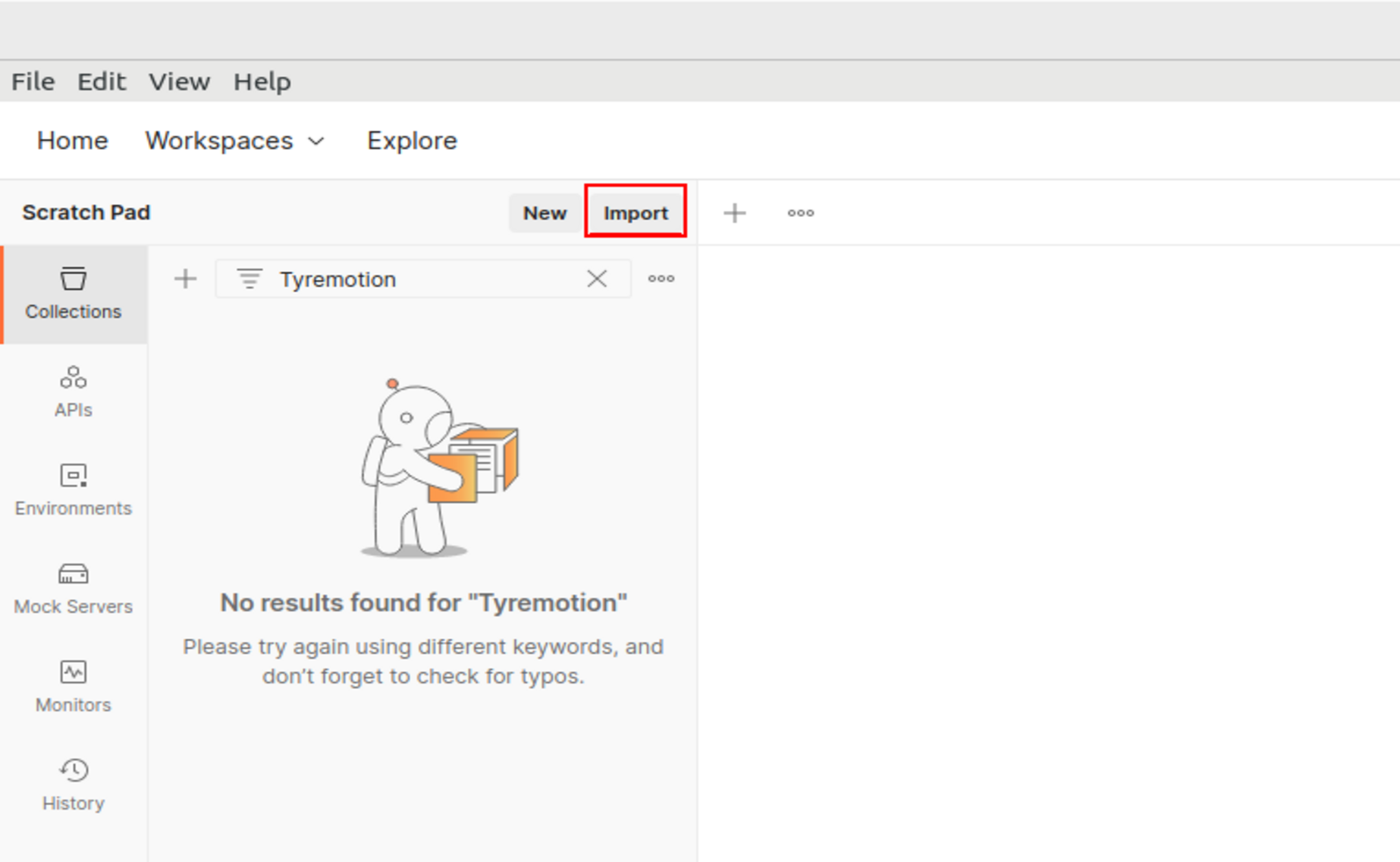
Open your Postman interface (https://www.postman.com/downloads/). In your collections panel, click on Import.
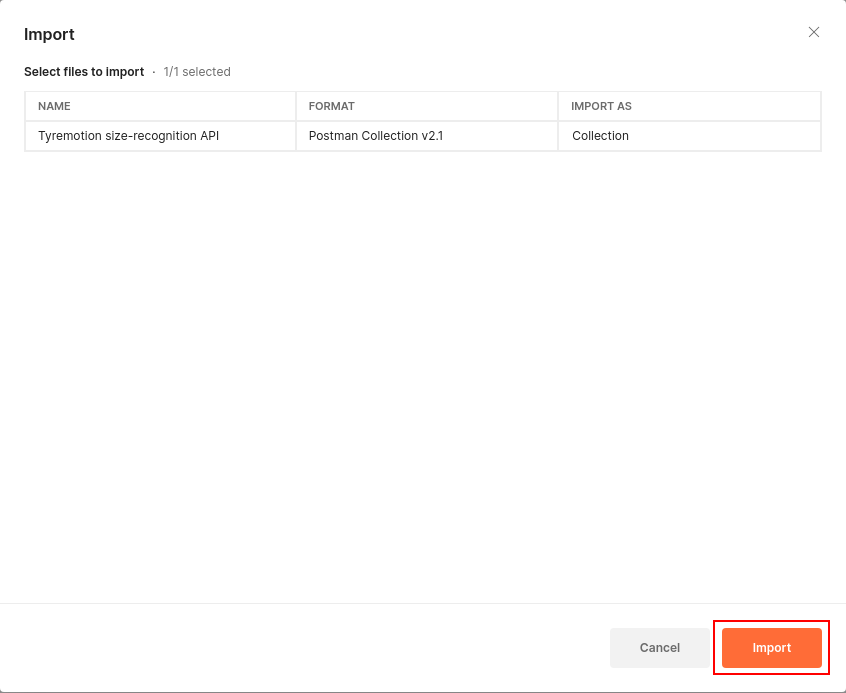
Select the TYREMOTION_API.postman_collection.json file you downloaded and import it into your Postman collections.
Configure the Postman collection
Set your API Key
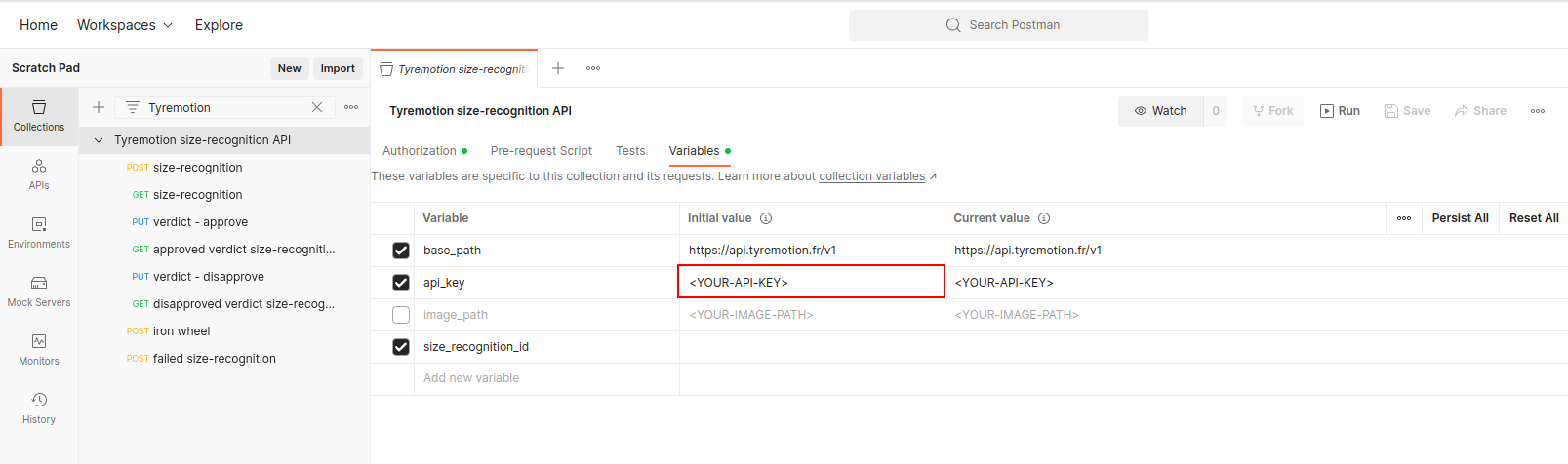
Before sending any request, you first need to set your API-KEY, otherwise your requests will be returned with a 401 Unauthorized HTTP status. You API key is set as a Collection variable. Click on the collection name and go to the Variables tab. Replace <YOUR-API-KEY> with your Tyremotion API Key.
Upload an image
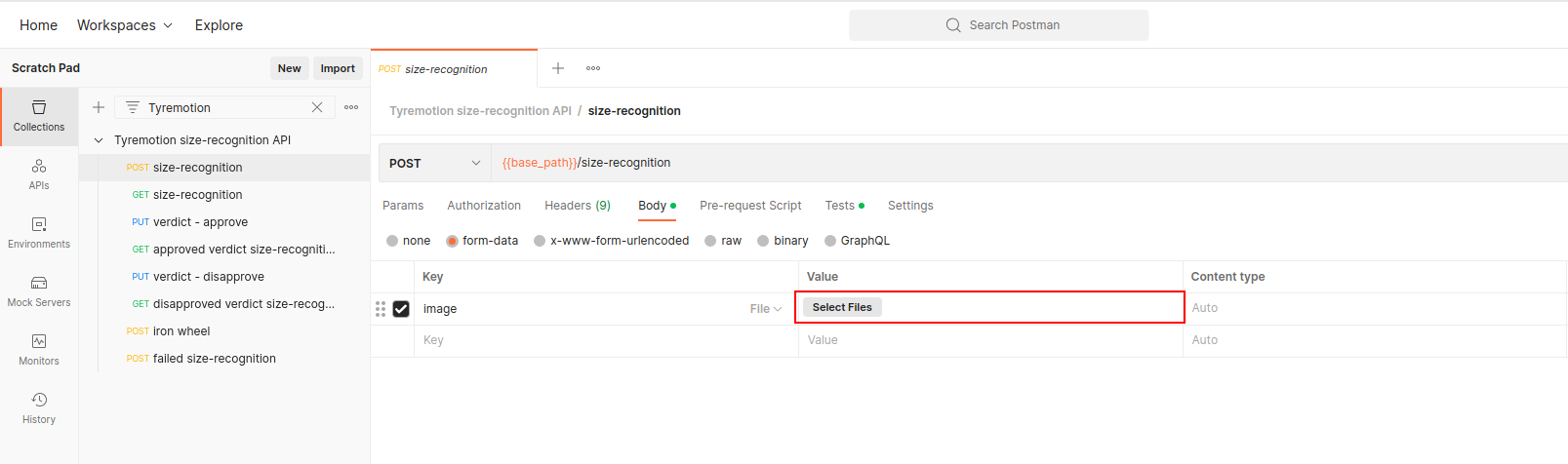
To be able to run the entire collection, you need to provide it with an input image. Click on the first request: POST size-recognition and in the Body tab, select a file as the value of the image key.
Run the Postman collection
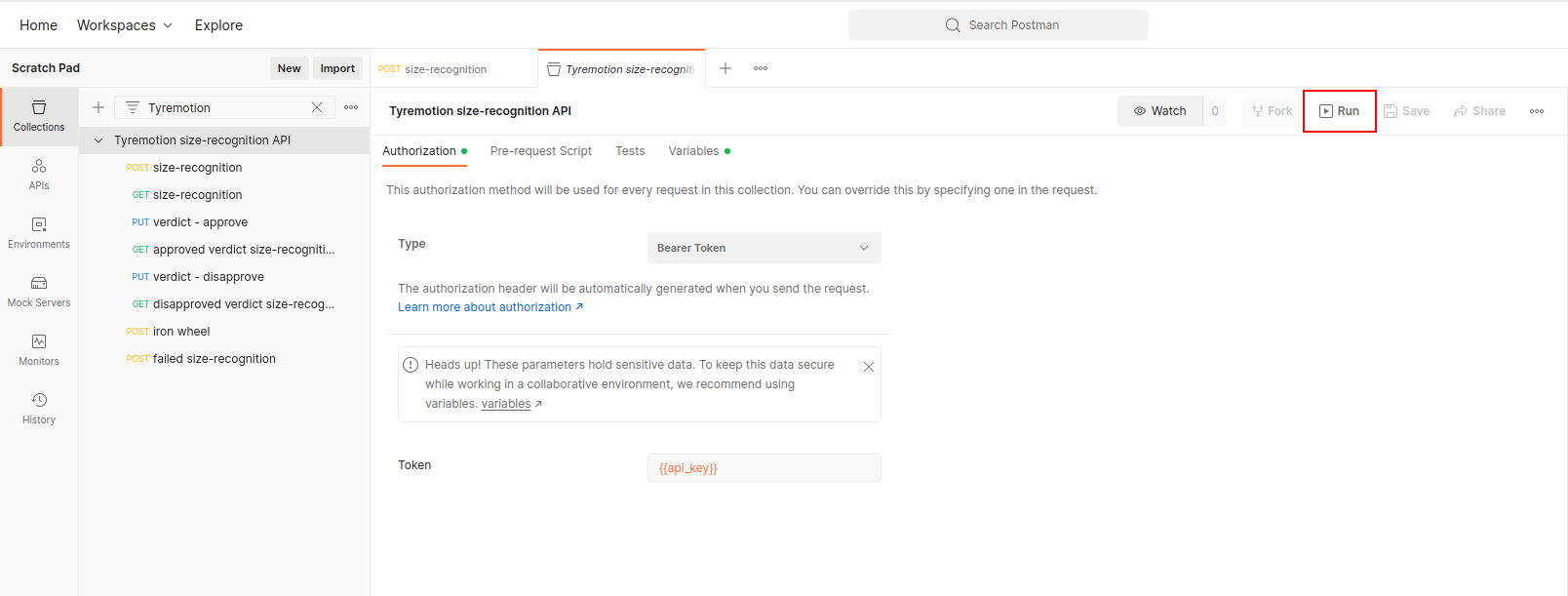
You are now ready to run the Postman Collection. Click on the collection name and click on Run
Select your run configuration and run the collection.
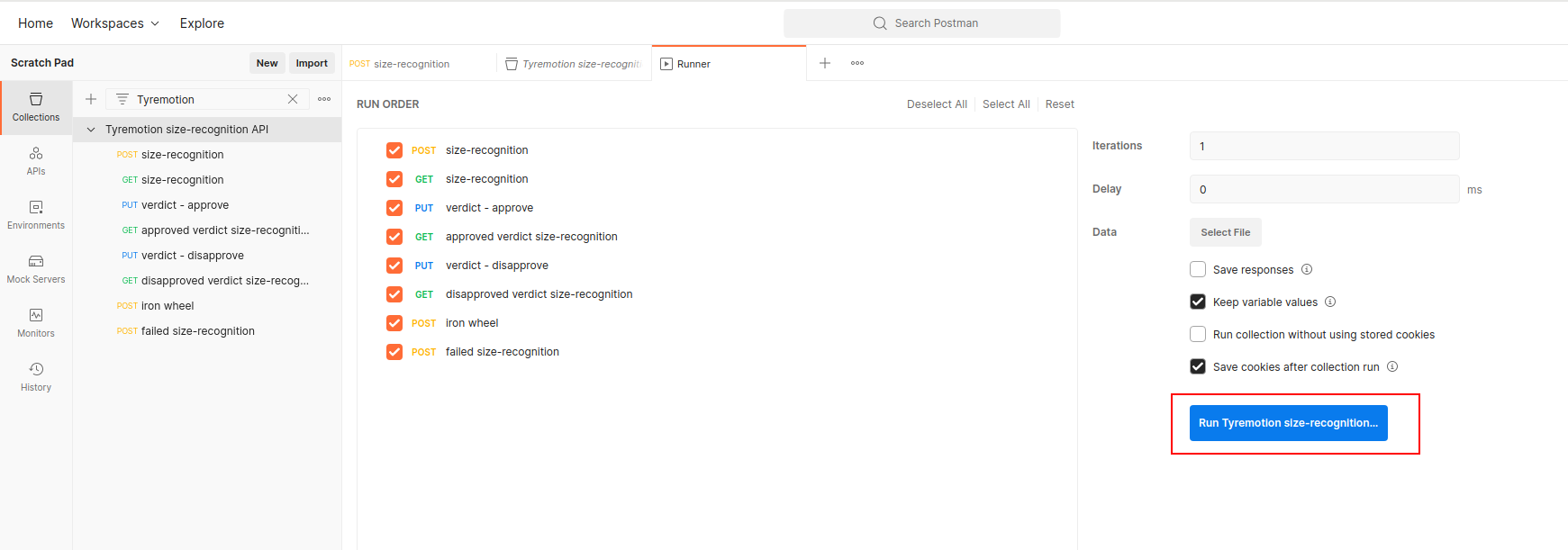
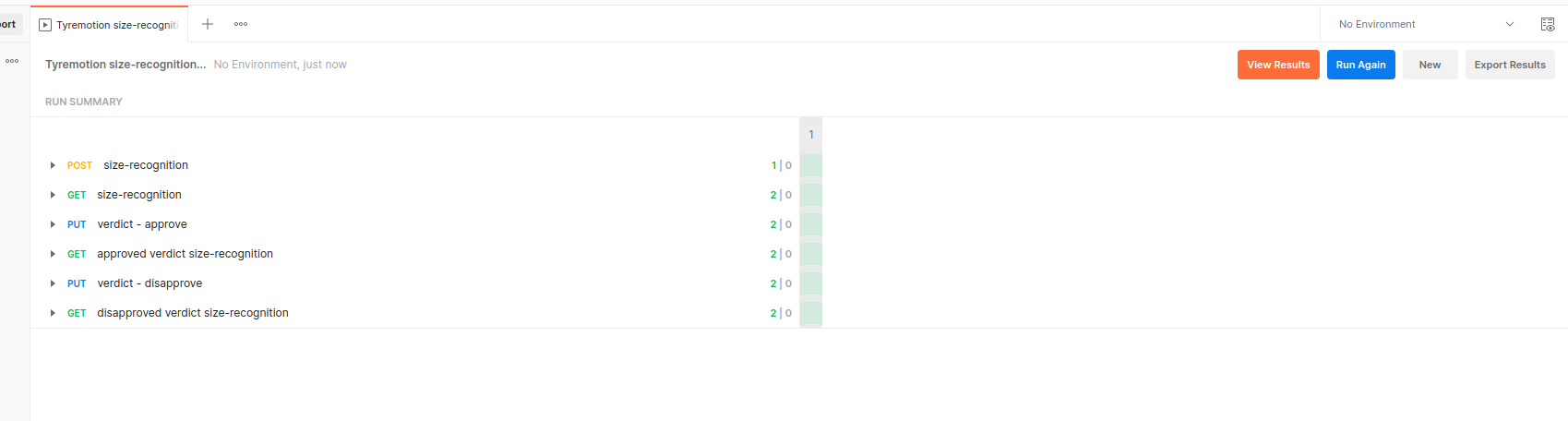
All tests should pass in your run summary.